Not everyone has a place to store large equipment. We have a mixture of tools and equipment that we own and are on loan from other members. These include but are not limited to Grinders, Drills, Saws, a Welder, a Laser cutter, wood CNC and a 3D Printer!
Our group is made up of a diverse set of skill sets and backgrounds. If you need help work some idea you are working on, just ask! Most everyone is friendly enough to lend you a hand.
Sometimes you don't feel up to working on anything and just want to sit back and socialize among like minded folks. Come hang out with us every wednesday!
We regularly hold classes to help teach each other new skills. We've recently held classes on Cryptography, and Beginner's Electronics. We encourage everyone to teach a class, everyone knows something!
A hackerspace (also referred to as a hacklab, makerspace, or hackspace) is a community-operated workspace where people with common interests, often in computers, technology, science, digital art or electronic art, can meet, socialize and/or collaborate. Learn More at Wikipedia
We would love to have you join us. Stop by on Wednesday for Open Hack night and check us out or check out our meetup calendar for other events. Learn more about membership
I know we all expect mobile games to be rigged. Anything goes in the name of engagement and retention numbers, but it’s always hard to prove. Hidden odds, complicated algorithms and “power ups”, and incomprehensible stat sheets all obfuscate the actual pRNG (psuedo Random Number Generator). But recently, a mobile game I’d been playing held a special event that let you roll dice. This should be a clear look straight at the results of the RNG, but is it?
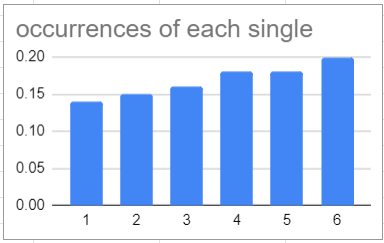
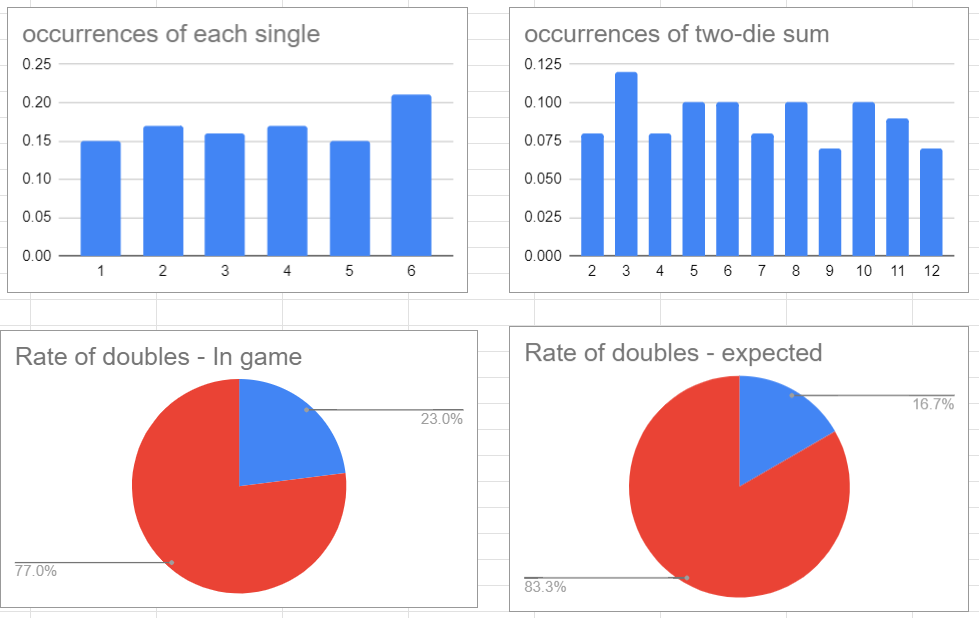
To find out, I rolled a pair of electronic dice 200 times, meticulously noting the values in a spreadsheet. The things we do for science. At first glance, intuitively, the data looks off:
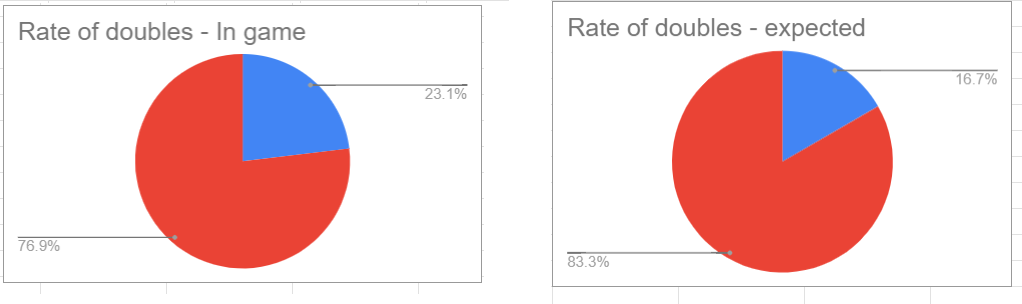
That doesn’t look right at all. These should be even (aside from random noise), and instead we have a evenly sloped line – showing that higher numbers are encouraged on the dice (and in-game, higher values are rewarded). Now that we’ve got that down, lets look at doubles (also rewarded in-game):
We’d expect a 16% chance (first dice comes up X. Second dice has a 1:6 chance of matching X), but we’re at 23%. More damningly, Doubles occurred at a 30% rate in the first third of the data (not pictured, see spreadsheet at end). It seems the odds change as you play, starting strong to hook you before tapering towards (but never getting to) a natural rate.
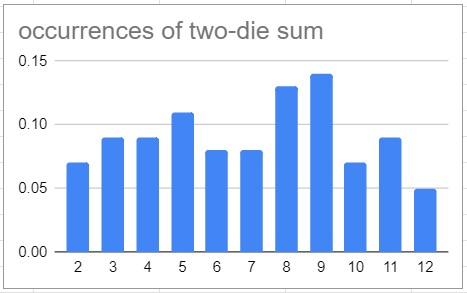
The final aspect that I chose to examine was the rate of 7s. 7s are also rewarded, but rewarded so heavily it would make the game too easy if they came up too often.
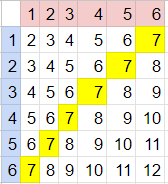
But seven should be the most commonly rolled sum. If we put together a table we can calculate the exact chances:
There are 6 out of 36 possible results that are 7, more than any other number. However in our gameplay 7 came up less often than 3, which only has 2 possible creations! (1+2 or 2+1).
So here we have several indicators that the RNG is not truly random, nor even psuedorandom, but instead a weighted number generator that is watching the combined totals in order to manipulate the player into playing more, striving to get that 7 that should be just around the corner. But do we have proof? Perhaps I just got particularly unlucky several hundred times in a row. So how unlikely is it for this to occur?
For the two-dice example, we only had 6^2 options, so we could build a table and calculate the odds by hand. However, in order to build a table to match all 200 runs, we’d have (6^2)^200 options! Even google gives up at that point.
This is where we get to the hard math. Binomial distributions – essentially, how likely is a combined result of X, given N trials and a probability per-trial of p. This requires a lot of summations, factorials, and integrations… I don’t have time for that, I have fake dice to roll! Luckily excel will do it for us: BINOM.DIST([occurrences], [trials],[probability per trial], [cumulative or single])
So, for example, the odds of flipping 5 or more heads in 10 tosses is BINOM.DIST(5,10,.5, TRUE [meaning x or more, not exactly X]), and excel tells us this is likely 62% of the time. So lets look at our two biggest red-flags:
The chance that we got only 16 (or less) sevens, given 6/36 odds (6 of the 36 possible combinations result in 7), out of 200 rolls: BINOM.DIST(16,200,6/36,TRUE) = .03%, about 1:3000 odds.
The chance that we got 46 (or more) pairs, in 199 trials, given 1:6 odds: BINOM.DIST(46,199,1/6,TRUE) = .7%, about 1:120 odds.
And we can combine these and look for the chances that these both occur together, 1:(3000*120) = 1:360k. I didn’t adjust for the lack of 7s making doubles more likely, but these rough numbers are close enough to prove the point. I’m sure if we added the chances for the single dice rolls as well we’d be in 1:1M odds that these results are natural.
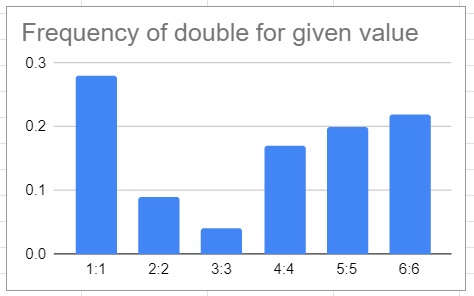
Potential mechanism of action: There may be a simple algorithm that would result in all of these red flags: If a 7 is rolled, flip a coin. If heads, return 7. If tails, increment one dice. This rule change would explain the slope of the singles, the lack of 7s, and the increase in doubles – but this increase would be located only on 4:4. So to test this hypothesis, lets create a graph showing the frequency of each pair:
We’d expect a flat chart, so this is ridiculously unnatural. However, it’s not unnatural in the way we hypothesized above, so the proposed algorithm is clearly not the one they are using. Fewer ones were rolled than any other number, and yet they are most likely to be in a pair. Clearly something else is going on.
So remember: When you’re not paying for the product, you may be the product.
*Update!*
More data more better, right? I gathered another 280 pairs and reran the analysis.
The rate of doubles is identical at 23%. The individual numbers were a bit more mixed, but still trended towards the most 6s, and not nearly the correct number of sevens.
Rerunning the binomial distribution on the combined data set leads to:
23% rate of doubles in 475 throws: .017% = 1:6000
(39)7s in 475: 1:17M
Both: 1:100T
About a year ago, we were smashing up a TV with Mammoth (video) and I fell in love with the look of the broken LCD, and decided to make it into a table-top. Despite veering wildly offcourse throughout this build - and using almost none of the original parts – that carnage set this project underway.
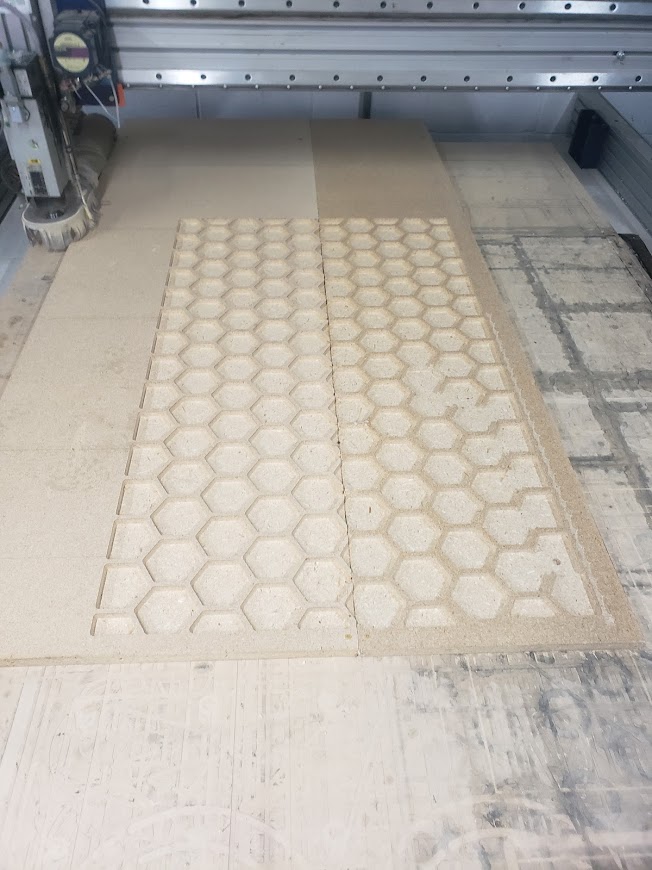
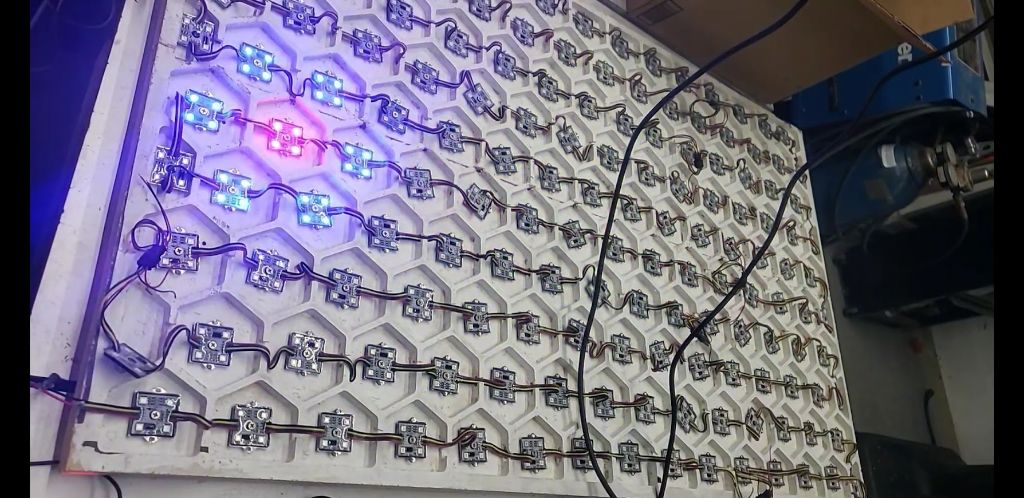
First step was to CNC the base, an array of hexagons to serve as cells beneath the surface. You might think the first step would be to figure out what the end product would look like… but nah. I knew I wanted some multicolored lighting, and hexagons make a cool pattern, might as well start. Plus, it was a fun excuse to play with the CNC.
Then I painted this array, and added WS2811 LED modules (link, but you can find them cheaper elsewhere – search for “36mm ws2811″) to each cell:
After that, it was time to program. This was definitely the most fun portion of the project. I started with Conway’s Game of Life - but Conway’s Game of Life is only played on a square grid, and I chose to use hexagons. Additionally, CGOL uses binary states – a cell is either on or off. Purely because it looks cool, I wanted to use an analog state so I could blend between colors. So I designed a new version, aiming for a system that wouldn’t reach any steady-states, and the rules are as follows:
Initial Setup:
A random number of cells, chosen at random, start with 25% heat, every other cell starts with no heat.
Gameplay - for each cell, repeating indefinitely:
1) If your neighbors are hot, get a portion of their heat and add it to your own.
2) If you get too hot, you explode, die, and lose all your heat.
3) If your neighbor explodes, you die from blast damage and lose all your heat, but you do not explode (no cascading explosions).
That’s it. Very simple concept, but the implementation is a little bit trickier, especially on an Arduino. The small micro size means we need to optimize for both speed and memory. The first issue I found is there wasn’t enough room in RAM to hold the addresses of all the neighbors. The massive 6×150 byte array – essential so cells know who their neighbors are – has to be stored in flash memory. Once you figure out the keywords that the Arduino IDE wants, this is pretty simple:
const static PROGMEM byte neighborArray[][6]
And then to access those bytes:
memcpy_P(localNeighbors, neighborArray[i], 6);
There should be shortcuts to access those values directly… but there aren’t, at least not for bytes. Just copy them into a temporary array whenever you need to read them and save yourself a lot of headaches.
Memory issues solved! Onto the speed problem. There are two main portions of the program: Display and Calculation. During the display phase, the speed was fine, I even had to add delays to get the right fade between the previous state and the current state. But during the calculation phase, the program would visibly lag and interrupt the smooth flow of the display phase. To start with the obvious optimizations, I used simple byte math. Addition, subtraction, and bit-shifts. Very little multiplication and never any division. But optimizing the math wasn’t enough, and we had to get tricky. Instead of calculating the next state for the whole array at once, I only calculated 5 new cells at a time. By increasing the steps in the display-phase fade to 30, I was able to replace the display-phase delays with these calculations. This meant that I could continuously calculate the next array while animating the previous change, eliminating the stutter from my program. This made it a little harder to track the current state of anything, but nothing a few extra arrays couldn’t fix.
After that, it was onto aesthetics. How do we translate a byte into a 3-byte color in a way that looks good. The simple version is: 1-125 directly increased the blue value of the color, and then 125-255 decreased the blue value while increasing the red value.
The complicated version involves an analog input to choose a starting color between blue and green, and then a tweaking the brightnesses because LEDs get brighter linearly as the PWM increases, but your eye will perceive brightness logarithmically (an LED with twice the current only appears 150% brighter). Luckily, we don’t have to actually do that math, we can just fake it by getting brighter slowly for the low values and quickly for the high values. To say this in a nerdy way with lots of math:
//create a color between oldstate and newStateTemp, stepped by phase
//30 phases per change uint32_t StateToColor(float oldstate, float newState, float phase) {
//if are <75, fade up blue/green slowly (at half rate) if (interstate < 75) {
//colorfade(colorcomponent,brightness) is %colorcomponent * state, with speed optimizations, and overflow protection to make sure it’s a byte. return Color(0,colorfade(color1g,interstate>>1),colorfade(color1b,interstate>>1)); }
//75-125, fade up blue/green faster (at full rate, but account for the earlier slowness so there’s not a visible step) if (interstate < 125) { return Color(0,colorfade(color1g,interstate-37),colorfade(color1b,interstate-37)); }
//125+, fade out blue/green and fade in red.
//fade in red doubly fast because it has 125-255 to go from 0-255
//fade in red slightly faster than that to max out red early
//so it doesn’t immediately disappear when it dies next round. int adjColor=(250-interstate-45); if (adjColor<0){ adjColor=0; } int adjColor2=2.2*(interstate-125); if (adjColor2>255){ adjColor2=255; } return Color(adjColor2, colorfade(color1g,adjColor), colorfade(color1b,adjColor)); }
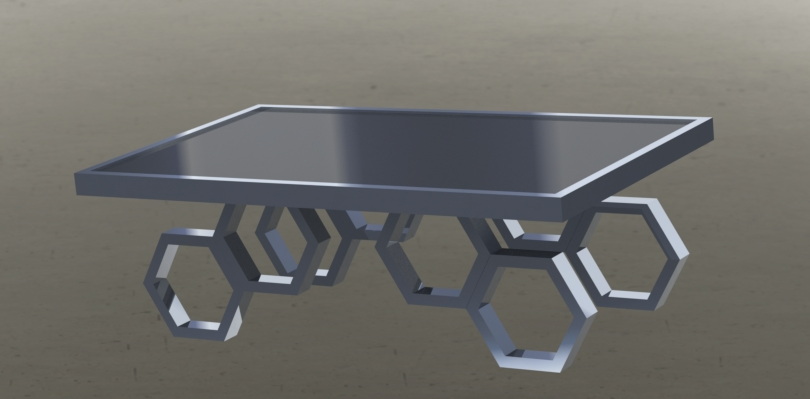
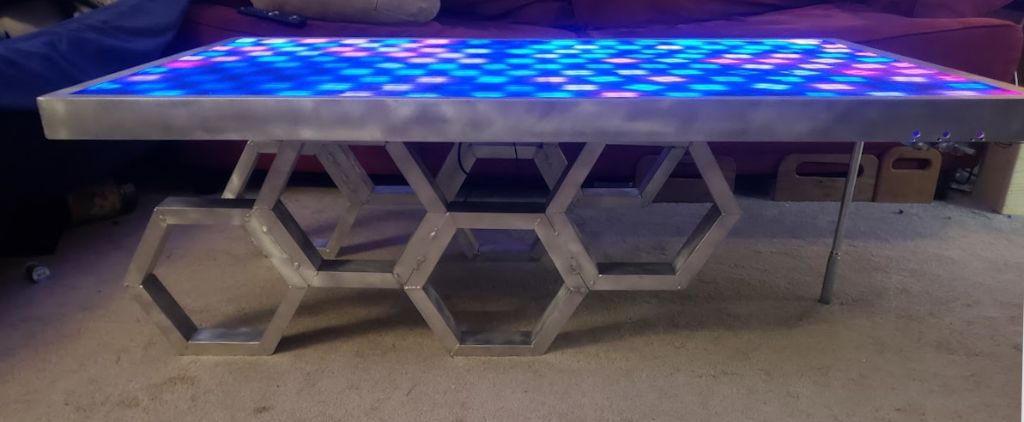
After that, the electronics were done and all that was left was turning it into a table! I sketched a few wildly varied designs for legs and settled on hexagons to match the display. Then I tried a few layouts for the hexagons in CAD to settle on a final design. Despite being far more comfortable in wood, I decided to use Aluminum and practice my TIG skills. I CNC’d a hexagonal jig in some scrap MDF to hold the pieces in the right spot, and blew through an entire tank of Argon doing a few hundred welds. And it worked! A few things clicked during the process and finally feel like understand tigging now. (Side note: My motorcycle buddy asked “So, can I just come to the hackerspace and practice welding for free?” “Yeah, totally.” “Wait really?” “Yeah, we’re an educational nonprofit. Our Mission statement is basically ‘teach anybody to build cool stuff’, so come by whenever”)
The surface is made of a sheet of plexi to hold down all the wires, a layer of diffraction grating (from the murdered TV that started all this) to spread the light in an interesting manner, and then a layer of fancy semi-transparent plexi to hide the guts but allow the light to pass through.